
When I start STAAD.Pro I get a message ‘Valid Trial License was not found or trial license expired, entering limited mode...' STAAD then simply fails to display and appears to close.
With the Bentley License Management Tool I am able to see STAAD.Pro licenses, check out one onto the local computer, but still get the same message when I start STAAD.Pro.
I checked to see the version of the Bentley IEG License Management Tool and STAAD.Pro from Control Panel > Add Remove Programs and they are 02.00.15.0 and 20.07.04.12 respective.
Solution:
Exit STAAD.Pro
1. Go into the registry editor (Start > Run - type in "regedit")
2. Go to HKEY_LOCAL_MACHINE> Software > Bentley > STAAD.Pro > License.
Look at the data for the field called "Type". If you find that it is "USL", please change it to "STANDARD". See the figure below
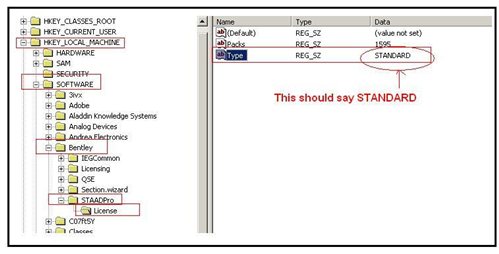
No comments:
Post a Comment
Thank you.